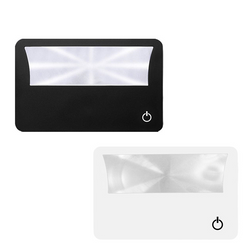
PVC Credit Card Magnifier With LED Flashlight
#GA495

Pricing Details

Production Time: 17 Working Days
QuantityPrice (USD)
100 $3.50 each
200 $3.00 each
500 $2.33 each
1000 $2.00 each
2000 $1.67 each
RRRRR
$50.00 each
Z
Our credit card sized magnifier provides powerful magnification and protects eyesight. It is perfect for reading books, restaurant menus, labels, maps, newspapers, magazines, etc., providing you with the best image clarity, suitable for all ages, especially the elderly. It is thin and durable, making it a great gift for the elderly or those with low vision, and a great way to promote your business, nursing homes, hospitals, projects, events, trade show giveaways and self-advertisement. It comes with an LED light to illuminate the magnifying glass area, allowing the magnifying glass function to be used normally in low ambient light conditions such as restaurants. Custom logos are available.

Normal Production Time
17 Working Days

Product Size
3.35" x 2.17"

Additional Information
Product Colors: Black, White

Imprint Method: Screen printing

Additional charges may apply

How to Place an Order

1. Search for a Product

  • Type a keyword in the search bar at the top of the website then click the "Search" button to see the product results. When you find a product you like, just click on the product from the results page to see full product details.
  • Once you've made your product selection, click the "Order Now" button. 

2. Customize the Product

  • On the following pages you will select preferred customizations such as product colors, sizes, & imprint colors, as well as upload artwork to be imprinted, & enter the shipping address & payment information for this order. 
  • Click "Next" at the bottom right to continue through the each page of the process.

3. Order the Product

  • The last step is to review and confirm your order. Check the product quantities, product options such as colors and sizes, confirme the correct artwork has been loaded, and lastly confirm that the shipping address is correct.
  • Once you are ready, click "Finish" at the bottom right to submit your order.